
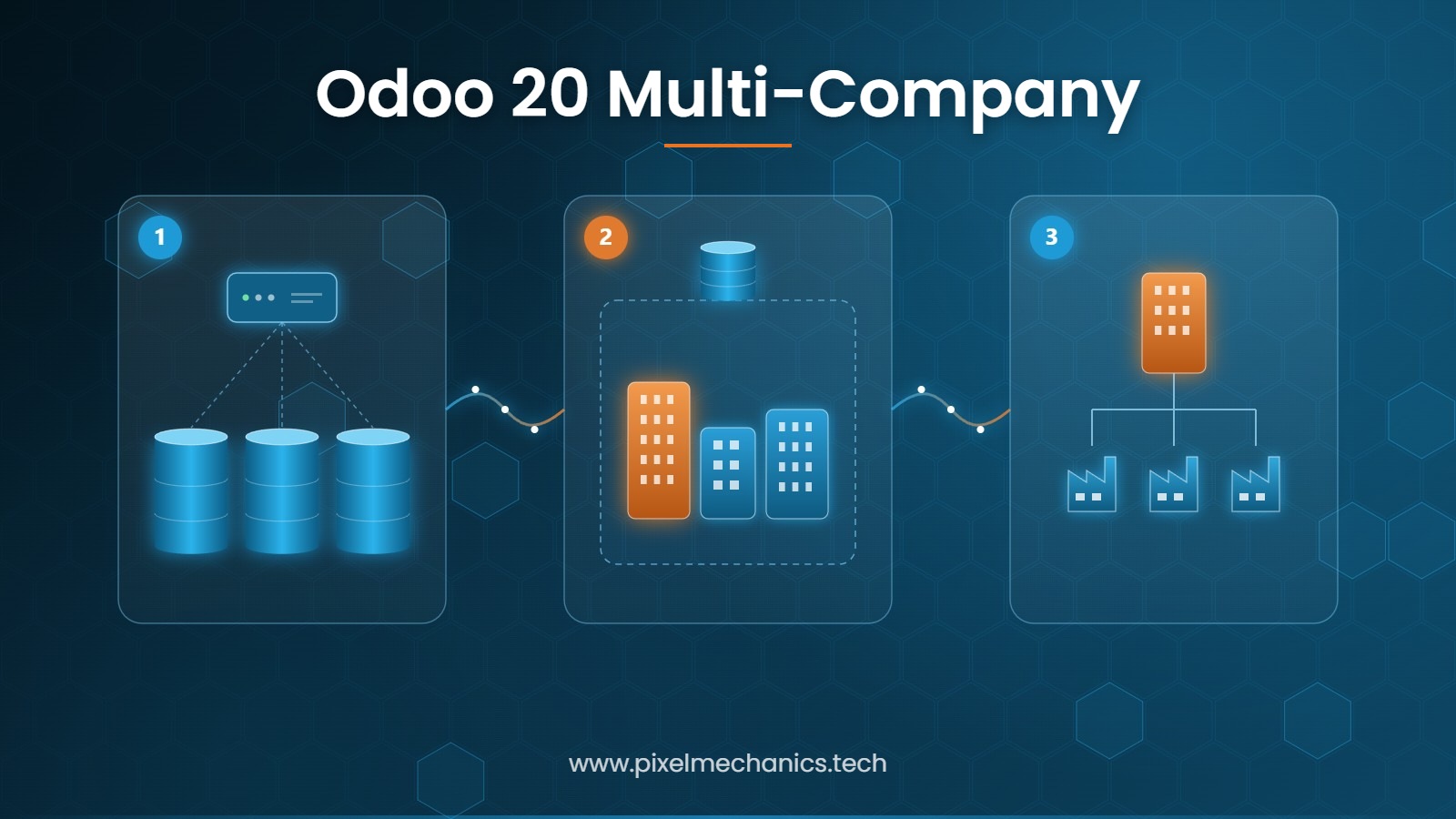
Two companies, one system – that sounds like a configuration detail and is in fact a decision about structure. Anyone running more than one legal entity faces the same question sooner or later: how far apart should the systems be kept? Odoo has two separate answers to that, plus a third level that is easy to miss. This article sorts out which option fits which situation, what stays shared, where the limits are, and what the decision costs.
Tenant or company: where exactly is the difference?
In German the word “Mandant” carries two meanings at once, and that is where most misunderstandings start. In Odoo they are two different things with two different consequences.
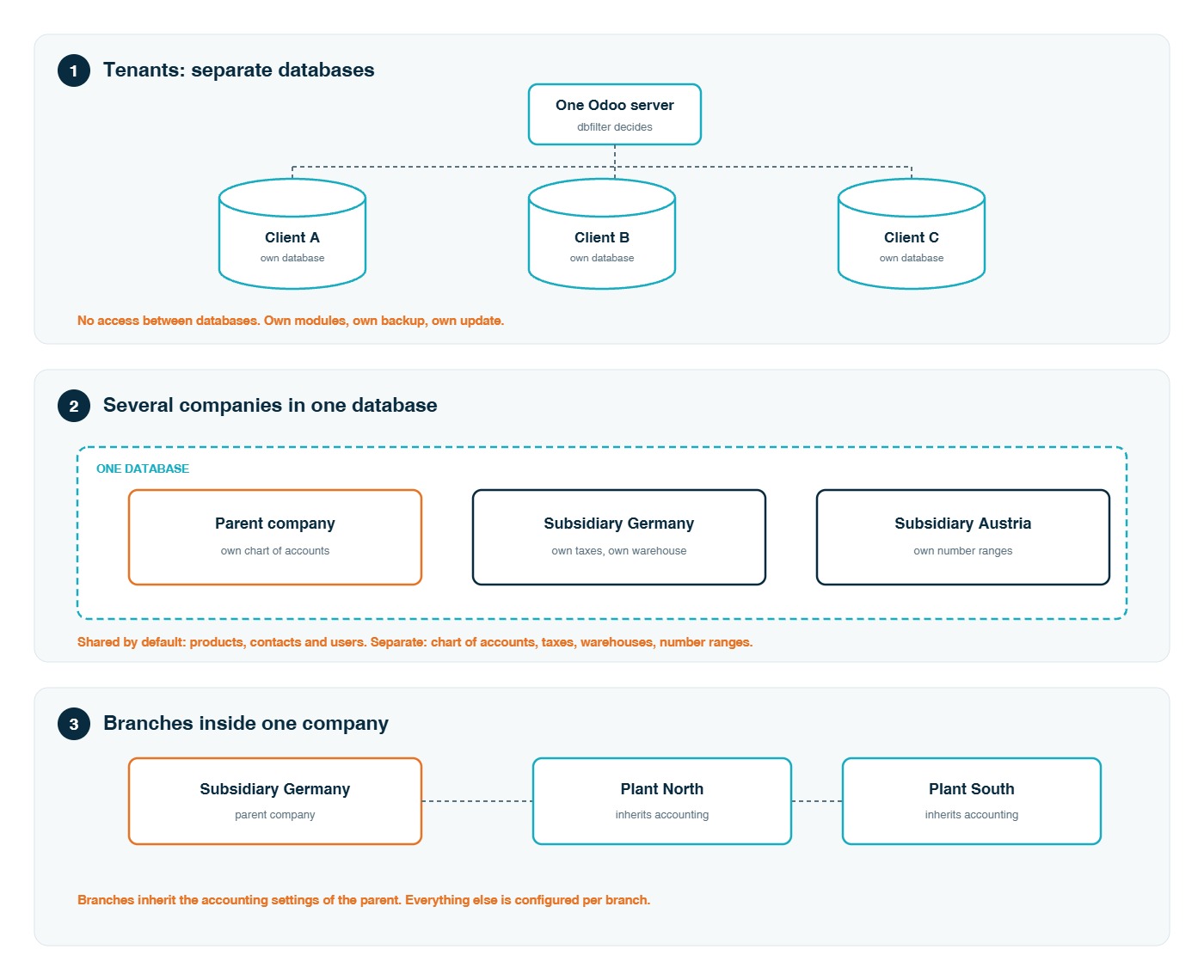
- Separate databases. One Odoo server, many databases. Typical when the parties have nothing to do with each other – different clients, different owners.
- Several companies in one database. One database holds several legal entities that belong together – the companies of one group.
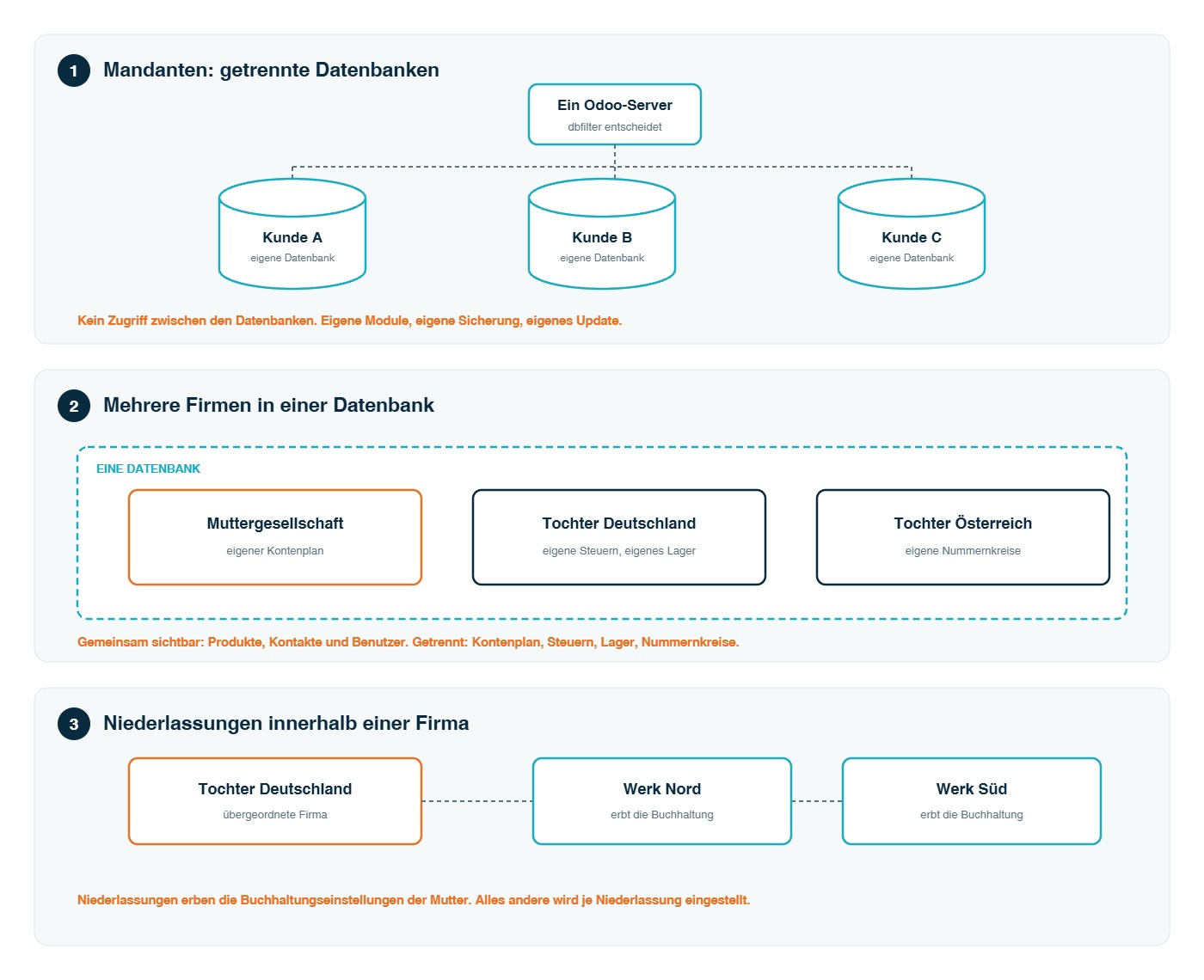
On top of that sits a third level: branches within a single company. The diagram shows all three.
Level one: tenants as separate databases
Odoo is built for this from the ground up. The documentation puts it plainly: a single Odoo system may run and serve a number of database instances. Every tenant gets its own PostgreSQL database; one server serves many of them.
Which database answers which address is decided by a setting called dbfilter. It is a regular expression that may include the requested host name. The common pattern ^%d$ maps the first subdomain to the database of the same name: a request to customer.example.com lands in the database “customer”.
Odoo Online and Odoo.sh work exactly this way themselves. What follows from it is the strongest separation the system offers:
- Data, users, modules, backups and updates are separate per database.
- There is no access path between two databases. Not for users, not for reports.
- Each database can sit on its own version and follow its own release cycle.
One point is worth taking seriously: for servers hosting several databases in production – above all when Website is in use – the documentation treats a correct dbfilter not as an option but as part of securing the deployment. Without it, features break and databases become visible that should not be.
This level fits when the entities have nothing to do with one another: different owners, different clients, no shared master data, no joint reporting.
Level two: several companies in one database
This is the level most groups actually mean. A company is a record in Odoo, and companies can be arranged as a tree: parent, subsidiaries, and below them branches. Five mechanisms make it work.
- A company field on every document. Invoices, orders, stock moves and journals all carry a company. If the field is empty, the record belongs to all companies at once – a product, a contact, a category.
- Record rules. A user sees only records of the companies currently active in the company selector at the top right. They can be assigned to one or several companies and show several at the same time.
- A consistency check on saving. An invoice belonging to company A cannot use an account, a tax rate or a warehouse of company B. The system refuses the mix instead of quietly booking it.
- Company-dependent values. The same field can hold a different value per company – a revenue account, a payment term or a cost price on one and the same product.
- Separation where it legally matters. Chart of accounts, taxes, fiscal year, number ranges, warehouses and bank accounts are kept per company.
This level fits when the entities belong to one group, share customers or products, and management wants to see aggregated figures without switching systems.
Level three: branches inside one company
Branches are subdivisions of a company – regional offices, plants, departments – that operate under a common parent. They inherit the accounting settings of the parent. Everything else is configured per branch: loyalty programmes, price lists, stock locations, its own address and its own logo. A branch can itself be the parent of further branches, which makes multi-level structures possible.
Reports can be produced for the parent alone or together with its branches, depending on what the user is allowed to see. Access works the same way: a user can be limited to one branch while an administrator at parent level manages all of them.
Two warnings are worth more than any configuration tip here.
- Clarify the structure before you build it. A company that has been defined as a parent cannot be converted into a branch afterwards – that would break access rights. Always create the parent company first.
- Independent subsidiaries are companies, not branches. If an entity has its own legal identity and its own books, it belongs on level two. Branches are for subdivisions that share the parent’s accounting.
And one consequence that is easy to overlook: adding a branch to a company switches on the multi-company functions. The cost section below applies from that moment.
What stays shared – and what runs separately
This table is the part worth printing out before the workshop. It decides how much separation you actually get.
| Area | Default | Good to know |
|---|---|---|
| Products | shared | Sales price and reference are shared, the cost price is held per company. |
| Contacts | shared | New contacts are visible to all companies unless a company is set on the record. |
| Users | shared | One login, several companies – what is visible is controlled by the company selector. |
| Chart of accounts and taxes | separate | Per company, including fiscal year and number ranges. |
| Warehouses and banks | separate | Warehouses are not created automatically for companies added later. |
| Modules and version | shared | All companies in a database run the same apps, the same version and the same backup. |
Between the companies: selling, stock and payments
Once several companies live in one database, they can do business with each other – and Odoo can write the counterpart document by itself. Three switches control it:
- Create vendor bills. When one company posts an invoice to the other, the matching vendor bill appears there automatically.
- Create sales orders. A confirmed purchase order on one side becomes a sales order on the other, with the warehouse taken from the delivery address.
- Create purchase orders. The same in reverse, with the warehouse taken from the receipt address.
For each of these you decide whether the counterpart document is created as a draft or validated straight away. Draft is the safer setting while the configuration is still settling.
Stock can also move between companies without any sales or purchase document: resupply one warehouse from another company’s warehouse, deliver a customer order from a sister company’s stock, or have a purchase delivered straight into another company’s receipt operation.
A newer piece is inter-company clearing. If company B collects a payment for an invoice that company A issued, Odoo settles the customer receivable on both sides and books the balancing entries between the two companies by itself. That replaces the spreadsheet that otherwise tracks who owes what inside the group. It needs a dedicated clearing journal and its own payable and receivable accounts – deliberately separate from the ones used for normal trade.
One point for the licence discussion: the modules behind the automatic counterpart documents are Enterprise modules. The clearing module for payments is licensed as open source. We checked both in a live Odoo 19 Enterprise installation rather than taking it from a comparison table.
And a trap worth naming: the counterpart documents only land correctly when fiscal positions and the country localisations are set up properly on both sides. Odoo also does not create warehouses automatically for companies added after the initial setup – those have to be built by hand.
What Odoo 20 improved here
Multi-company is not a new feature, and that is a good sign – the model has been stable for years. Odoo 20 nevertheless sharpened exactly the points that hurt in daily group operations:
- Routes can now be used to replenish one company’s stock from another company’s stock.
- A sales order can be delivered from another company’s warehouse or its pick-up points.
- The valuation cost of moved products is now transferred properly between the companies – which is what makes the group figures add up.
- Changes to a linked sales or purchase order, such as price or quantity, are passed on to the other company instead of drifting apart.
- Synchronised vendor bills are matched automatically against the synchronised orders.
- Journals are now included in the consolidation of several ledgers instead of being excluded from it.
- VAT returns can be filed for several companies without authenticating again each time.
What does a second company in Odoo cost?
This is the part that surprises people after the fact, so it belongs before the decision, not after it. Switching on multi-company functionality in a database on the Standard plan automatically triggers an upsell to the Custom plan. Odoo states this openly in its own documentation.
- With a yearly or multi-year contract an upsell order is created, with a 30-day window.
- With a monthly contract the subscription switches over automatically, and the new rate applies from the next invoice.
- The One-App Free plan is not affected.
Two things follow from this. First, the cost is not charged per company – it is a jump in the plan, and it applies to the whole database. Second, the trigger is not only “adding a second company”: adding a branch switches the same functions on. We go through the current list prices in the article on Odoo-Preise 2026Odoo pricing 2026.
The limits – and when several companies are the wrong answer
The multi-company level buys separation where the law demands it and leaves it out everywhere else. That is a deliberate design, and it has a price:
- Contacts, products and users are visible to everyone by default. Restricting them is possible, but it is a decision per record, not a wall.
- All companies share the same modules, the same version and the same backup. A company cannot stay on the old version because its project is not ready.
- A mistake in an access rule hits every company at once. In separate databases it would hit one.
There is also a case where Odoo advises against its own feature, and the advice is sound: a new product line or a new division inside one legal entity is not a reason to create a company. It inflates the database and buys separation nobody needs. Analytic accounting and a second warehouse do the same job with a fraction of the complexity.
And one expectation worth correcting early: the separate consolidation app no longer exists. Figures across companies come from the accounting reports, where several companies can be selected at once. That is aggregated reporting – useful, fast, and enough for management. It is not a statutory group consolidation with capital consolidation and the elimination of intercompany profits. If you need that, you need a process alongside Odoo, not inside it.
Which option fits which situation
| Your situation | The fitting level |
|---|---|
| Different owners, nothing shared, separate release cycles | Separate databases |
| A group of legal entities with shared master data and business between them | Several companies in one database |
| Several locations of one legal entity with one set of books | Branches under one company |
| A new product line or division inside one entity | None of them – analytic accounting and warehouses |
| A statutory group consolidation is required | Several companies plus a process outside Odoo |
Conclusion
The question is almost never “can Odoo do multi-tenancy”. It can, on three levels. The question is how much separation your structure actually needs – and every bit of separation you buy, you pay for in shared master data you then have to keep apart by hand, or in a database you can no longer update in one go. Groups with business between the entities are usually best served by several companies in one database. Entities that have nothing to do with each other belong in separate databases. And a new division inside one company is usually neither. Decide this before the first company record exists, because some of it cannot be undone afterwards. If you want to think it through for your own structure, we are happy to do that with you: Erstgespräch vereinbarenArrange an initial conversation.
Sources
- Odoo documentation: Companies, odoo.com/documentation – Companies (retrieved on 26 October 2026)
- Odoo documentation: Multi-company, odoo.com/documentation – Multi-company (retrieved on 26 October 2026)
- Odoo documentation: System configuration, section dbfilter, odoo.com/documentation – System configuration (retrieved on 26 October 2026)
- Odoo: Odoo 20 release notes, odoo.com/odoo-20-release-notes (retrieved on 26 October 2026)
- Module licences checked directly in a running Odoo 19 Enterprise installation (26 October 2026)
- PixelMechanics: Odoo-Preise 2026Odoo pricing 2026, Odoo-EinführungOdoo implementation and Odoo-SupportOdoo support
Frequently asked questions about multi-tenancy in Odoo
What does multi-tenancy mean in Odoo?
Two different things. On the first level a single Odoo server runs many separate databases, each with its own data, modules and backup. On the second level one database holds several companies that share master data but keep their own accounting. A third level, branches, sits below a company and inherits its accounting settings.
What is the difference between a tenant and a company?
A tenant is a database. Two tenants cannot see each other at all. A company is a record inside a database. Two companies in the same database are separated by access rules, not by a wall – products, contacts and users are shared across them by default.
Do we need a separate database for every legal entity?
Usually not. Separate databases are the right answer when the entities have nothing to do with each other. If they share customers, products or do business among themselves, several companies in one database is the simpler and cheaper setup.
Does every additional company cost extra?
Not per company. What costs money is the step itself: switching on multi-company functionality in a database on the Standard plan triggers an automatic upgrade to the Custom plan for that database. Adding a branch has the same effect. The One-App Free plan is not affected.
Can staff of the subsidiary see the parent company’s data?
Only if they are assigned to that company. A user sees records of the companies that are active in their company selector, and can be limited to a single one. Documents such as invoices and orders always carry a company and stay inside it.
Are customers and products visible in all companies?
By default yes. New contacts and products are created without a company and are therefore shared. Setting the company field on the record restricts it to that entity. Worth knowing: on a product the sales price and the reference are shared, while the cost price is held per company.
Can one company sell to another company in the same system?
Yes. Odoo can create the counterpart document automatically – a vendor bill from an invoice, a sales order from a purchase order and the other way round, as a draft or already validated. Stock can also be moved between companies without any sales or purchase document.
Can a company be converted into a branch later on?
No. A company that was created as a parent cannot be turned into a branch afterwards, because that breaks the access rights. This is the strongest argument for drawing the structure on paper before the first company record is created.
Can Odoo produce a statutory group consolidation?
Not in the sense of commercial law. The separate consolidation app no longer exists; figures across companies come from the accounting reports, where several companies can be selected at once. That gives you aggregated management figures quickly. Capital consolidation and the elimination of intercompany profits remain a process outside the system.
What happens at upgrade time when several companies share one database?
They all move together. One database means one version, one update and one backup for every company in it. That is an advantage as long as the group plans its release dates jointly, and a constraint as soon as one entity wants to stay behind.